Ranks
Creating ranks
Any Squadron can create custom ranks from the Ranks page:
- Click "New Rank"
- Give it a name
- Choose which permissions the rank grants
- Save
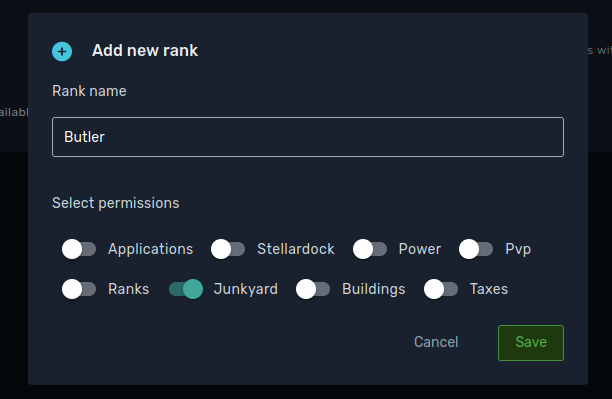
You can then go to your member list and assign the new ranks to any member.
A rank name takes up to 15 characters, letters, numbers and spaces only, and a rank has to grant at least one permission to be saved. A rank cannot be deleted while any member still holds it, so move them off it first.
Ranks also carry their own tax rates, set in the same window. What they cover and how they compare against the squadron wide rates is explained in global taxes.
Remember
Only squadron leaders can create, edit, delete and assign ranks, unless they delegate the Ranks permission itself.
Remember
Leaders do not need any rank or permission. They can always do everything.

Every squadron starts with a LEADER rank that cannot be renamed or deleted, and it holds no permission list because the leader never needs one. The only thing worth opening it for is its tax rates, which are the ones the leader pays.
Permissions
| Permission | Effect | Actions |
|---|---|---|
| Applications | Allows managing squadron applications and invites | - Accept and decline applications - Send and cancel invites |
| Stellar Dock | Gives access to Stellar Dock buildings | - Unlock buildings - Set, start and stop taxes |
| Power | Everything related to Space Stations | - Build space stations - Manage upgrades - Claim a system |
| Ranks | Manage squadron ranks | - Create, edit and delete ranks - Assign ranks to other members |
| Junkyard | Clean up the Armory | - Retrieve items from the Armory permanently |
| Buildings | Manage squadron buildings | - Purchase building upgrades |
| Taxes | Manage squadron taxation | - Manage global taxes |
| PvP | Everything related to the Battlefield | - Attack and leave zones - Add and remove members from PvP groups - Buy the squadron banner |
| Dungeons | Manage squadron dungeons | - Roll a new squadron dungeon - Start a dungeon run |
| Kick | Remove members from the squadron | - Kick a member |
Remember
Every squadron member can donate items to the Armory, and borrow from it. The Junkyard permission is different: it lets the assigned member retrieve an item and keep it in their own inventory for good, which removes it from the squadron and frees up a slot.
TL;DR:
- Leaders can do everything without holding a rank.
- Delegate only the permissions you need to delegate: Junkyard and Kick are the two that cannot be undone.