Your Ship
The player panel
To check on your ship, go to the Player panel.
Your ship's hull can be customised with Skins.
Ship stats
Whenever you level up after Battling, your ship receives 5 stat points to be assigned.
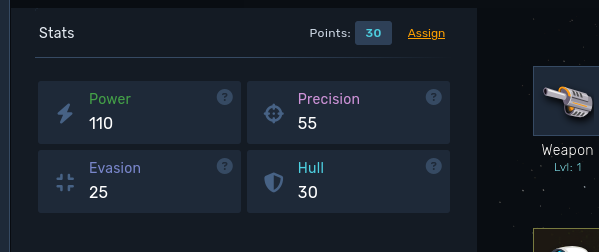
Click "Assign" to update your ship stats and assign points to:
- Power will make your attacks stronger
- Precision will give you better hit chance against enemies
- Evasion will make you dodge and avoid being hit
- Hull will give you more hitpoints to fight against more powerful enemies
Equipment
You have a chance to get new equipment when Battling. You can also drop Blueprints, which are used to craft powerful gear. See Crafting.
It will appear on your inventory, and clicking on one will show you how it differs from your current equipment and also what actions are available.
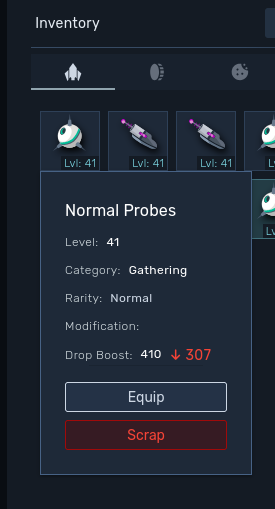
Rarity boosts an item's value as follows:
| Item rarity | % |
|---|---|
| Normal | +0 |
| Uncommon | +10 |
| Rare | +25 |
| Unique | +50 |
| Epic | +75 |
| Legendary | +100 |
Your inventory
Everything you own is stored in the inventory, split into five tabs:
- Ship parts: the equipment you are not wearing.
- Gathering resources: what your droids bring back from Gathering.
- Materials: Metal Scrap, Anomalies, crafting materials and enemy drops.
- Blueprints: the recipes used in Crafting.
- Catalysts: the modules you install on crafted gear. See Catalysts.
Ship parts, blueprints and catalysts have a storage cap. The counter next to the "Inventory" title shows how much you are carrying, and turns red once you reach the limit.
| Tab | Cap |
|---|---|
| Ship parts | 200 |
| Blueprints | 300 |
| Catalysts | 500 |
Gathering resources and materials stack, so they have no cap.
Your currencies (Credits, Quantum Cores, Cosmic Dust and Stellar Tokens) are always visible at the bottom of the inventory.
Filtering and locking
The magnifier button opens a filter box that searches the tab you are on by name, rarity or category. In the Catalysts tab you can also filter by range: type 20+ to only see catalysts with range 20 or higher, 30- for range 30 or lower, and combine either of them with a stat or a rarity.
Any item, blueprint or catalyst can be locked from its menu, with the padlock button. A locked entry cannot be scrapped, one by one or in bulk, so locking is the safest way to protect your best gear before a cleanup.
While a filter is active, locked entries are hidden. The padlock button at the top of the inventory toggles between hiding and showing them.
With a filter active, extra tiles appear in the grid to lock every filtered item at once and, when locked entries are visible, to unlock every filtered item.
Item actions
Clicking an item in your inventory opens its menu. Which actions are offered depends on the item:
- Equip: puts the item in its slot, if your level in the skill that item is tied to is high enough: Battling for weapons and shields, Gathering for lasers and probes, Exploring for engines and sensors.
- Catalysts: opens the install panel. Crafted items only.
- Change modification: rerolls the modification of an anomalous item. Not available for weapons and shields.
- Enhance: raises the item rarity by one step. It needs the Selyn pet active, and does not work on legendary, already enhanced or starter items.
- Donate to armory and Return to armory: lends an item to your squadron armory, or takes back what you lent. A borrowed item cannot be scrapped or traded.
- Wire: sends the item to another player. You have to be in an inhabited system, unless you own permanent market access. Starter and anomalous items cannot be wired.
- Market: opens the Market listings for that item type, under the same conditions as Wire.
- Link in chat: posts the item in the chat so other players can inspect it.
- Scrap: turns the item into Metal Scrap. Disabled while the item is locked.
Scrapping
If you choose to scrap a piece of equipment, it will be transformed into Metal Scrap (check your inventory).
You will get different amounts of scraps according to the item rarity based on the following formula ( 1 + level / 10 ) * scrapMultiplier, rounded down. The level bonus only applies from item level 10 onwards. Below that, the amount is just the scrap multiplier.
| Item rarity | Scrap multiplier |
|---|---|
| Normal | 10 |
| Uncommon | 12 |
| Rare | 15 |
| Unique | 20 |
| Epic | 25 |
| Legendary | 35 |
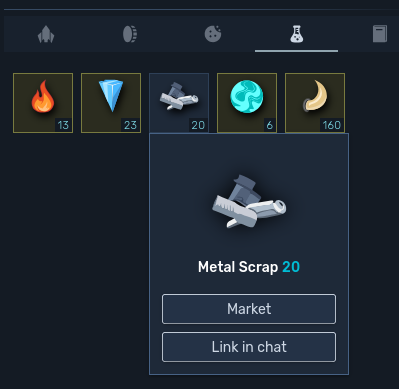
Blueprints can be scrapped too, and use a different formula: ( 50 + blueprint scrap cost ) * rarity multiplier * remaining charges, rounded down. The rarity multiplier goes from 1.5 for Normal up to 5 for Legendary.
Scrapping is not always a plain delete:
- Catalysts installed on the item are uninstalled and go back to your inventory. If that would push you over the catalyst cap, the scrap is blocked and you have to free some space first.
- Scrapping an anomalous item returns 1 Anomaly.
- The catalyst crafting scrap bonus increases the Metal Scrap you receive.
- Catalysts are the exception: they are not scrapped into Metal Scrap, but into Catalyst Parts. See Catalysts.
Metal Scrap can be traded, consumed at the Laboratory, used to craft items, or converted into crafting XP with the Craftron 3000 module in Base Building.
Mass scrap
There are two ways to salvage in bulk.
The mass scrap button at the top of the inventory opens a dialog for the tab you are on, so you can bulk salvage ship parts, blueprints or catalysts. Pick a rarity and a category, and the table lists everything that matches, sorted by value so the cheapest comes first (blueprints are sorted by remaining charges). Tick what you want to lose and confirm.
Equipped items, locked entries and items lent to your squadron armory never show up on that list.
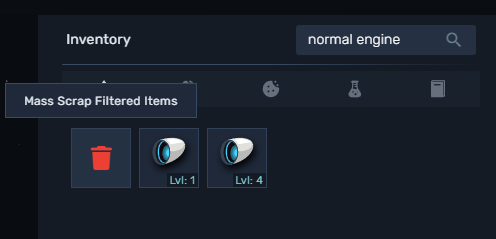
The second way is filter based. Type something in the filter box and a trash tile appears in the grid: it scraps everything the filter is currently showing, in one go.
Auto-scrap
Auto-scrap salvages your battling drops the moment they drop, before they ever reach your inventory. It is the answer to a full inventory while you farm high level enemies.
Open it with the auto-scrap button at the top of the inventory. Turn it on and pick a rarity threshold: everything strictly below that rarity is scrapped on the spot. Picking Rare, for example, auto-scraps normal and uncommon drops and keeps rare and above.
Blueprints have their own switch and their own threshold, so you can auto-scrap cheap gear while keeping every blueprint, or the other way around.
A few things worth knowing:
- Only battling drops are affected. Blueprints obtained from the Laboratory, from your pets or from the Battlefield are never auto-scrapped.
- You get the Metal Scrap right away, with the same formulas as manual scrapping, catalyst crafting scrap bonus included.
- Auto-scrapped drops still count towards your scrapped items statistic and the salvage daily quest.
- Nothing you already own is ever touched. Auto-scrap only sees new drops.